Visual QA as a CI Pipeline Stage
I merged a PR last month. The code review looked good. Tests passed. Then I opened the site on my phone and the sidebar was completely broken.
The fix was trivial—a missing media query. The bug was obvious once you actually looked at the mobile view. Nobody did.
So I added a pipeline stage that looks.
I open a GitHub issue that says:
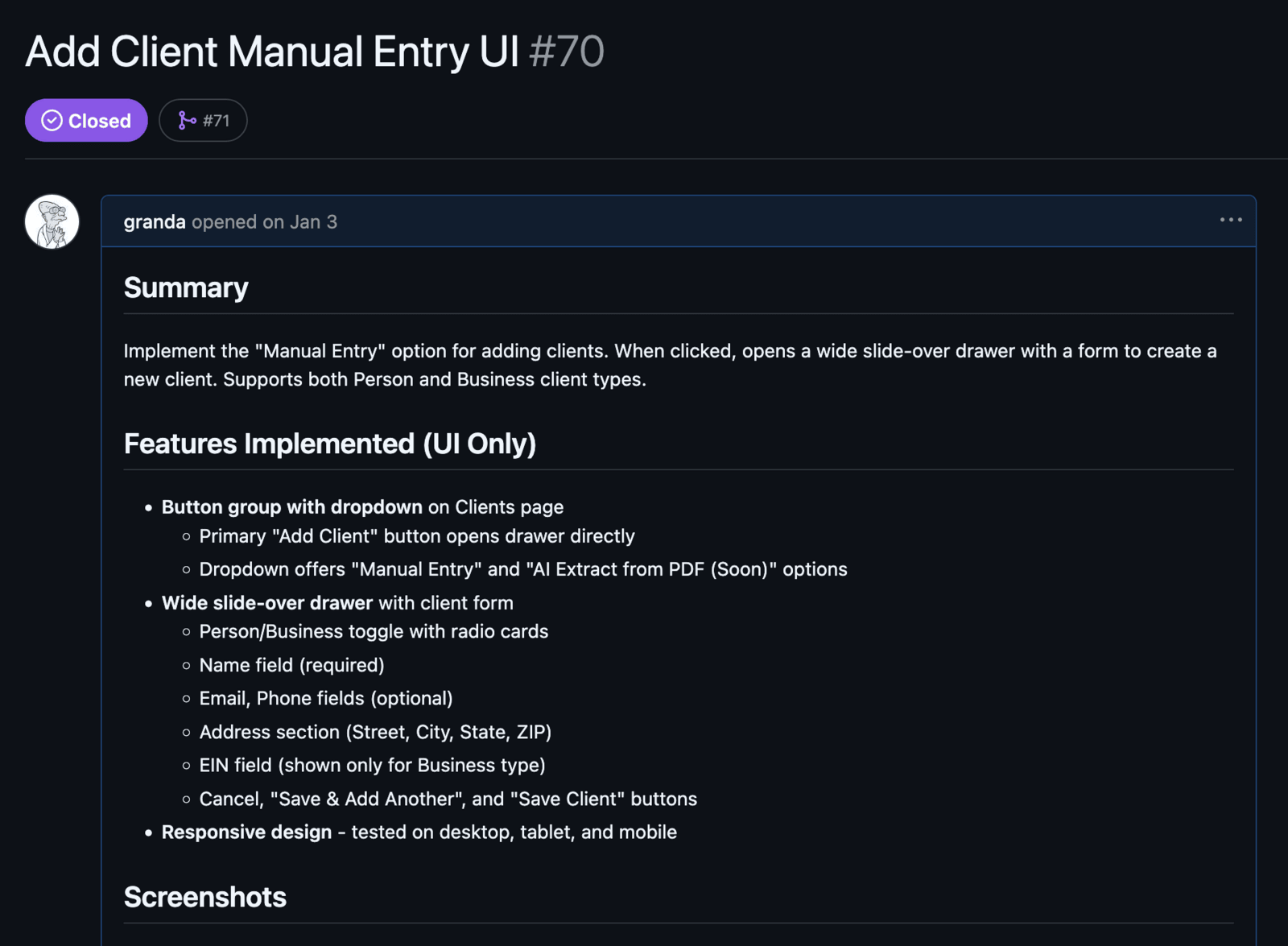
Implement the Manual Entry option for adding clients. When clicked, opens a wide slide-over drawer with a form to create a new client.
One commit later, the PR lands with 30+ screenshots proving every state works at every viewport. Zero manual testing. The only effort was writing the feature description.
The Concept
On every push to a PR, a GitHub Actions workflow:
- Boots a Docker Compose stack (Django + Postgres) from the PR branch
- Runs migrations and seeds a test user
- Hands the local URL to Claude Code with Playwright MCP (headless Chromium)
- Exercises interactive elements based on the PR diff
- Screenshots every state at three viewports
- Posts the results as a PR comment
Claude Code controls the browser. Docker Compose provides the app. GitHub Actions ties it together. Reviewers see proof of functionality without running anything locally.
%%{init: {"flowchart": {"subGraphTitleMargin": {"top": 3, "bottom": 10}}} }%%
graph TD
    A["PR Push"] --> B

    subgraph GHA["GitHub Actions Runner"]
        B["Checkout + Docker Compose"] --> C["Migrations + Seed Data"]
        C --> Agent

        subgraph Agent["Claude Code + Playwright"]
            direction LR
            D["Read PR Diff"] --> E["Map Files → URLs"]
            E --> F["Login + Navigate"]
            F --> G["Screenshot ×3 Viewports"]
        end
    end

    Agent --> H["PR Comment"]

    style GHA fill:transparent,stroke:#888
    style Agent fill:transparent,stroke:#888
The workflow itself is straightforward:
name: UI Screenshots
on:
  pull_request:
    types: [opened, synchronize]

jobs:
  screenshots:
    runs-on: ubuntu-latest
    permissions:
      contents: write
      pull-requests: write
    steps:
      - uses: actions/checkout@v4

      # ... Docker Compose setup, migrations, test user creation ...

      - name: Start services
        run: |
          docker compose -f docker-compose.local.yml up -d --wait

      - name: Install Playwright
        run: npx playwright install --with-deps chromium

      - name: Run Claude for Screenshots
        uses: anthropics/claude-code-action@v1
        with:
          claude_code_oauth_token: ${{ secrets.CLAUDE_CODE_OAUTH_TOKEN }}
          claude_args: >-
            --allowed-tools
            "mcp__playwright__*,
            Bash(gh pr diff:*),
            Bash(gh pr comment:*),
            Read,Glob,Grep"
          prompt: |
            You are a visual QA agent. Your job is to visually
            verify a UI deployment.

            PR: ${{ github.event.pull_request.number }}
            The Django app is running at http://localhost:8001

            1. Run `gh pr diff` to find changed templates/views
            2. Map changed files to URLs — only test pages
               affected by this push
            3. Login, then screenshot each page at three viewports:
               1440x900, 1024x768, 640x1136
            4. Save screenshots with descriptive filenames
            5. Post a PR comment with:
               - Each test performed with pass/fail
               - Any visual issues found
               - Total screenshots captured
The Viewport Matrix
| Device | Size | Why |
|---|---|---|
| Desktop | 1440×900 | Standard laptop |
| Tablet | 1024×768 | iPad portrait |
| Mobile | 640×1136 | iPhone SE |
Every interactive state gets captured at all three. A sidebar component generates 12+ screenshots:
- Page load (closed) — 3 viewports
- Trigger click — 3 viewports
- Fully open — 3 viewports
- Close animation — 3 viewports
Multiply by light/dark themes and you’re looking at 24 screenshots for one component. That’s the point. Exhaustive visual proof as a CI artifact.
What It Actually Outputs
Here’s real output from a PR that added a manual entry page. The agent posts a PR comment with a structured summary, screenshots at every viewport, and a test checklist:
Below that summary, the agent appends screenshots of every state it exercised. Here’s the desktop view—clients list with data, plus the Add Client drawer open:
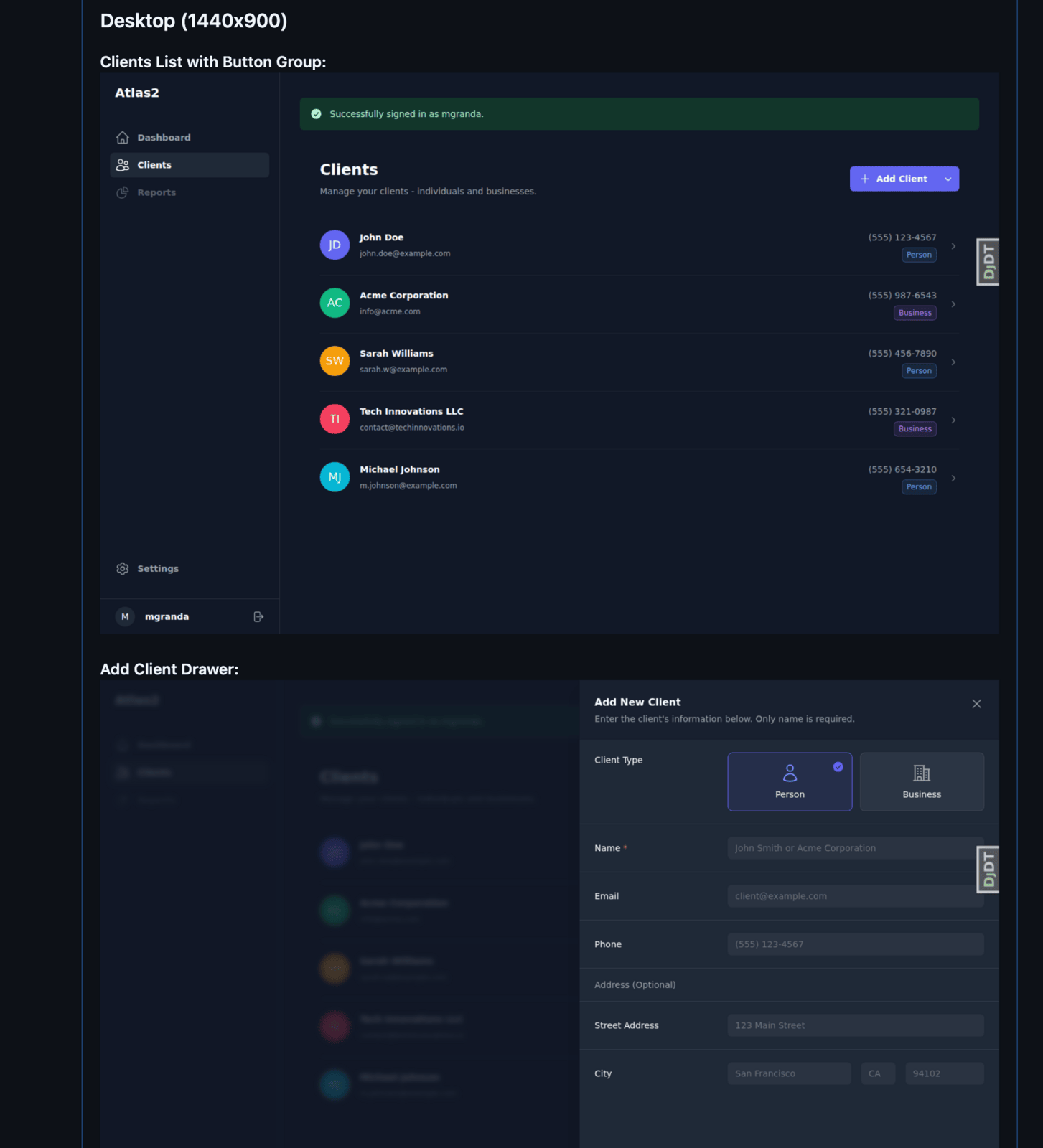
The agent tested:
- Empty form state
- Form with validation errors (missing required name field)
- Successful form submission
- Client list rendering with data
- Avatar fallbacks when no image
- Modal open/close transitions
- All three viewports
I skipped individual field focus states for this PR—diminishing returns on a simple form. The agent can do it, but 50 screenshots of text inputs getting focus isn’t useful signal.
The PR comment becomes a visual changelog. Every test run ends with a checklist:
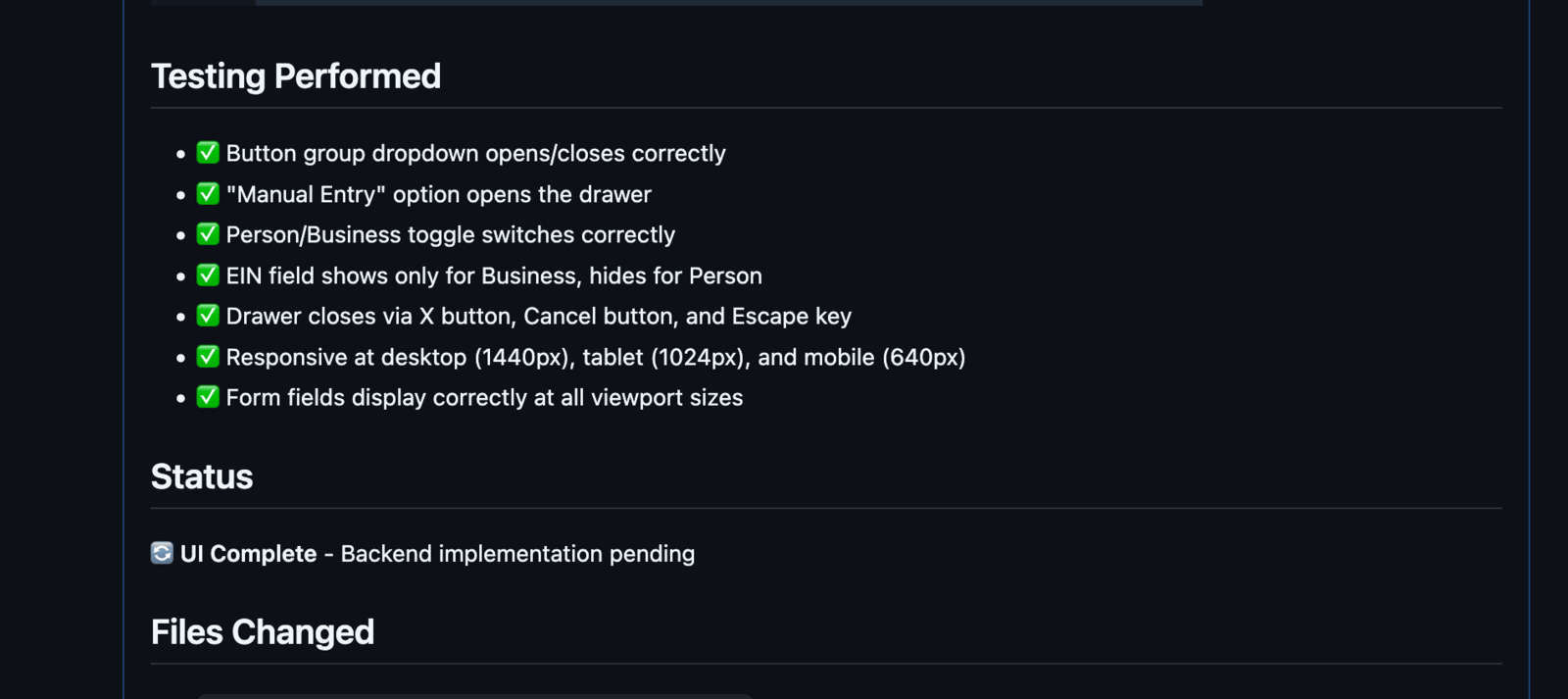
Six months from now, I can look at any PR and see exactly what the UI looked like when it shipped.
The Test Manifest
The prompt in the workflow above is generic — it works for any PR. The specificity comes from the diff itself. The agent reads gh pr diff, figures out which templates and views changed, maps those to URLs, and decides what to test.
For a form component, that means it will exercise:
component: ClientForm
states:
  - empty form
  - filled form (valid data)
  - validation error (submit without name)
  - submitting (loading state)
  - success (confirmation)
interactions:
  - submit empty form (trigger validation)
  - fill all fields, submit
  - verify client appears in list after submit
No manual test plan needed. The agent infers the test surface from the code changes.
Why Screenshots in PR Comments
Inline screenshots in the PR comment have a few advantages:
- Visible — reviewers see them without clicking through to artifacts
- Contextual — right next to the diff they’re reviewing
- Comparable — each push updates the comment, so you see before/after
- Auditable — the comment history shows what was tested at each commit
What This Catches
Real bugs caught in the first week:
- Dropdown clipped by
overflow: hiddenparent (only visible on tablet) - Button text invisible in dark mode (wrong CSS variable)
- Form labels misaligned on iPhone (flexbox gap issue)
- Hover state stuck after touch (needed
@media (hover: hover)) - Modal backdrop not covering full viewport on landscape tablet
Every one of these passed code review. Every one was obvious in the screenshots.
The Cost
Running Claude with Playwright MCP in CI takes 2-4 minutes depending on how many states need testing. For a typical PR touching one component, it’s about 90 seconds.
Compare to: deploying to production and finding out from users that the mobile layout is broken. Priceless.
The Shift
Visual QA has always been the bottleneck. You can automate unit tests, integration tests, even end-to-end flows — but someone still has to look at the UI. That’s been true for decades.
It’s not true anymore. Agents with browsers don’t just run scripts. They interpret, navigate, interact, and judge. The test surface isn’t hardcoded — it’s inferred from the change. Every PR gets exhaustive visual coverage that no manual process could match.
This changes QE from a gate to a guarantee. Not “did someone check it” but “the pipeline checked it, here’s proof.” Every PR, every push, every viewport. The QE role doesn’t disappear. It moves upstream. Instead of executing test plans, you’re defining what the agent should care about. Instead of catching bugs, you’re designing the system that catches them.